

Purpose Model Toolkit Sheet Type (JP)
Purpose Model Toolkit Sheet Type (JP)
Couldn't load pickup availability
The Purpose Model Toolkit is a collection of tools for editing Purpose Models. There are three types, and this product is a sheet type.
Product Overview
The Purpose Model Toolkit is a tool that makes it easier to edit the Purpose Model. The Purpose Model is a framework developed by Zukai Institute, Inc. and Yurie Kibi for visualizing co-creation. This framework, which visualizes who is involved in a project, for what purpose, and in what role, was introduced in the book "Purpose Model: How to Create Co-creation that Involves People," (published in Japanese) released on August 10, 2022, and has been utilized by many organizations.

The Purpose Model Toolkit is divided into the following three types.
1. Sheet type (Excel version)
2. Web tool type (PURPOSE MODEL STUDIO)
3. Slide type (Keynote version/PowerPoint version)
The one introduced on this page is the sheet type.
1 is a sheet type that can be edited in Excel. If you upload it to Google Spreadsheets, it will be more convenient for collaborative editing.
2 is a web tool type that allows for more intuitive editing, and allows editing close to the final form.
3 is a slide type that can be edited with Keynote or PowerPoint. It is recommended when you want to make a clean copy.
Each tool has its own characteristics. The table above summarizes the characteristics of the three tools in the Purpose Model Toolkit.
The sheet type cannot export diagrams by itself, and the web tool type cannot save data by itself, so we recommend that you basically use a combination of sheet type and web tool type.
The slide type has many elements and is difficult to operate, so it is suitable for those who want to fine-tune the layout and create a neat and clean copy. All the illustrations in the book "Purpose Model" were created using this sheet type. 
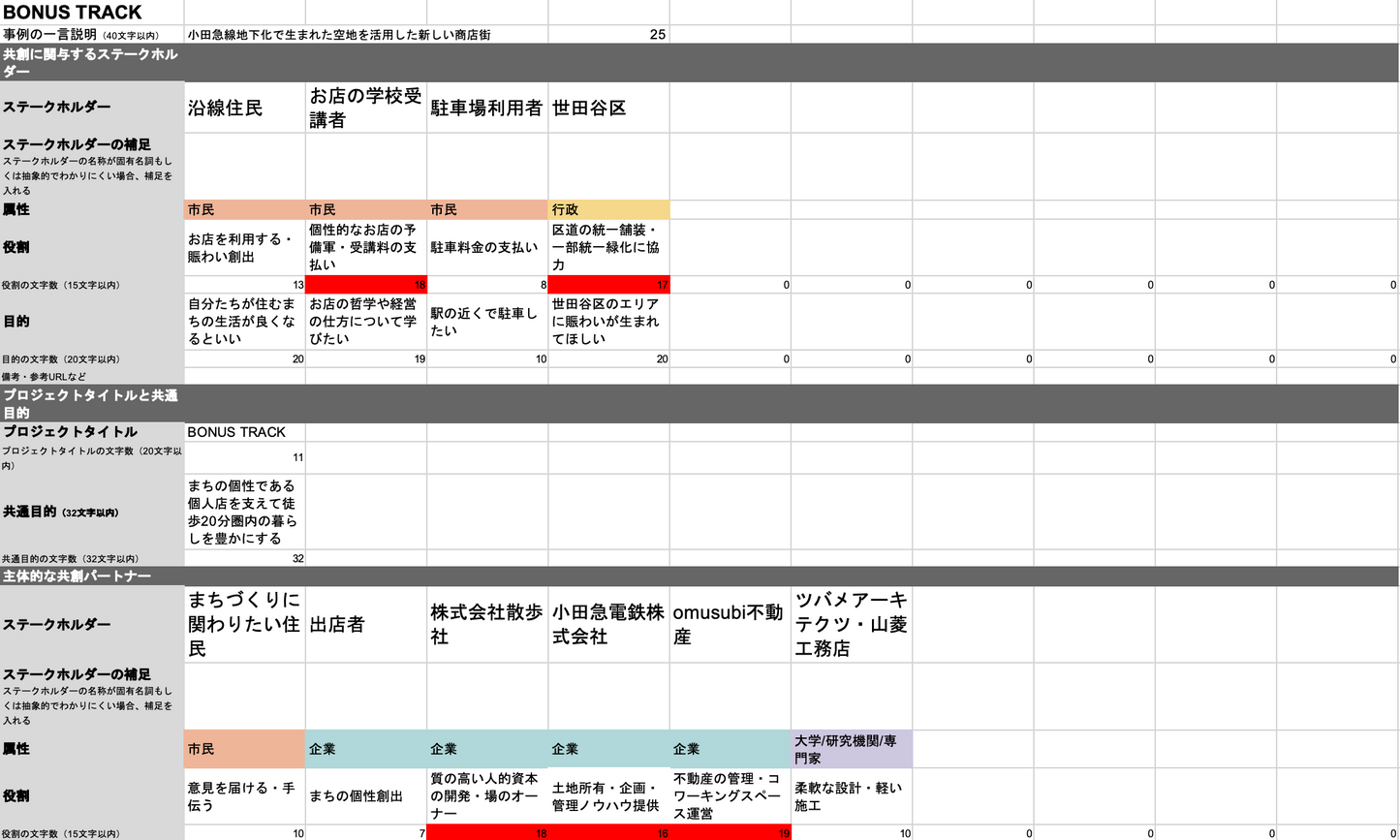
There are two types of sheets: template sheets and sample sheets. While looking at the sample, you can copy the template and enter the necessary information for the purpose model from scratch. The image above is the image entered in the sample. 
The sheet and the diagram of the purpose model correspond as follows. The upper and lower halves of the purpose model are divided in the center.
Instructions on how to use the tool are written on the sheet that says "最初に読んでください(Please read first)." Please read it before using the tool. Please note that if you delete rows or columns, you will not be able to import data into the web tool "PURPOSE MODEL STUDIO" later. 

At present, the most recommended way to use it is to save data using the sheet type and then visualize it using the web tool "PURPOSE MODEL STUDIO."
However, only the slide type allows you to adjust the layout in detail, such as the line spacing and size of text, so the slide type is recommended for those who want to make adjustments.
You can directly access PURPOSE MODEL STUDIO from the link below. Please note that it is only available on PC and Google Chrome.
For information on how to use PURPOSE MODEL STUDIO, please see the article below.
https://note.com/bizgram/n/ndf3dcffd4d7f
Product Features
- A "purpose model" that visualizes co-creation can be created in Excel. <br>A purpose model can be created using Excel.
- Necessary information can be entered compactly <br>The necessary information required in the purpose model is clearly shown as forms, so you can fill it in without hesitation.
- Instant visualization with PURPOSE MODEL STUDIO <br>You can easily visualize your purpose model by selecting all the data in Excel and pasting it into PURPOSE MODEL STUDIO.
Recommended for:
- Those who want to create a purpose model by themselves
- Those who want to visualize the co-creation of the projects they're involved in.
- Those who are interested in multi-stakeholder co-creation
Product features
- File format: Excel file
- File size: about 152KB (very light)
- Language: Japanese
Message from the creator
Thank you for your interest in the Purpose Model Toolkit Sheet Type. The sheet type has been used in conjunction with the slide type since the early days.
Uploading to Google Spreadsheet is the most useful way when creating a purpose model with multiple people. Until now, even if we created it in Excel, we would end up using slides to make clean copy, but with the new web tool named PURPOSE MODEL STUDIO, the convenience of Excel-type models has improved dramatically. Collaboratively edit and enter data in a spreadsheet with project members, then visualize and check the data in PURPOSE MODEL STUDIO. Going through this cycle is very effective when creating a purpose model. Please give it a try.
Important points to note when purchasing
- The expressions and reproducibility shown in this product vary from person to person, and do not necessarily guarantee profit or effectiveness.
- As a principle, we cannot accept order cancellations due to customer's convenience after payment is completed. Also, we will not refund the payment made. Please be kindly noted in advance. In addition, due to the nature of digital content products, returns are not accepted at all. Due to its nature, this will be treated as a defect issue rather than a return. In case of a defect, such as the content file being damaged and thus impossible to download or view, we will cancel the charge after our investigation. Problems due to the customer's unique environment are not eligible for return.
- A receipt will be issued automatically. If necessary, click “領収書を印刷する” (Print Receipt) on the screen displayed after purchase or in the email sent after purchase to issue one.